Keroberos Face Keycaps by NomNom Figures - Kit Overview
Three Kero-chan keycaps from NomNom Figures: a snacking face, a dizzy face, and a headset face, each a single ~20 mm print for the top row of a mechanical keyboard.
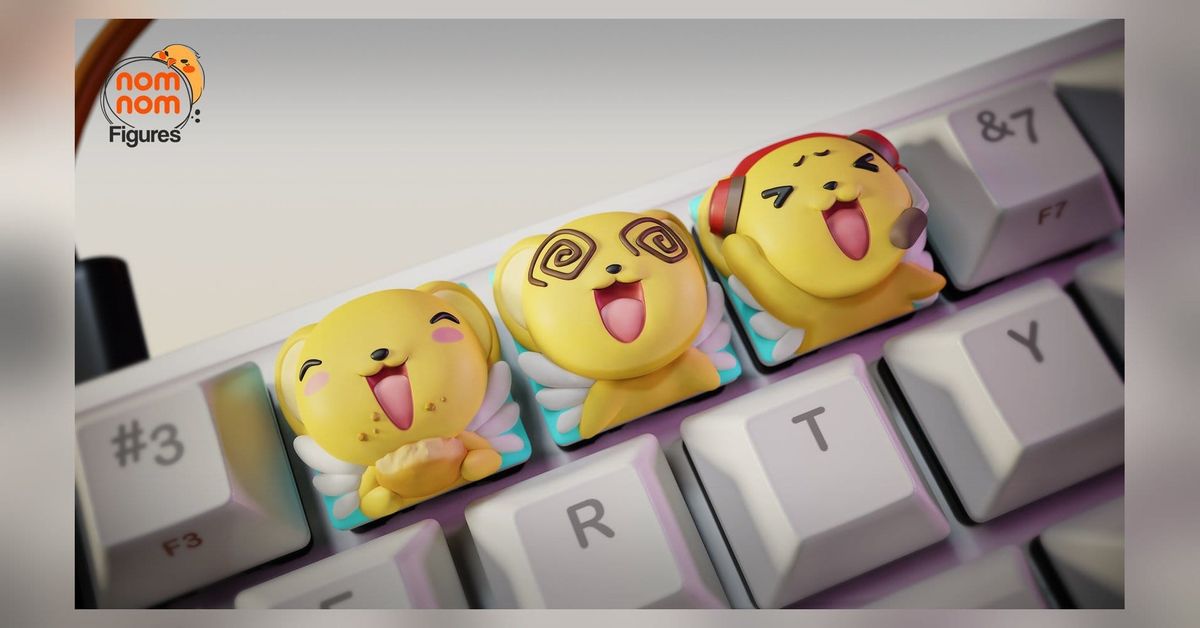
Keroberos Face Keycaps, from Cardcaptor Sakura, by NomNom Figures. This is not a figure. It is a set of three Cherry-MX-style keycaps with Kero-chan's face and paws sculpted on top, three expressions, one file each.
I wrote this from the studio's files and renders. Nothing here has been printed yet. Ratings are estimates from the STLs.
At a glance
- Studio: NomNom Figures
- Character and source: Keroberos, in his small Kero-chan form, from Cardcaptor Sakura
- Section: Anime
- Versions and sizes: three alternate faces, one keycap each.
Face 1.stl19.8 × 12.4 × 19.1 mm,Face 2.stl20.5 × 12.4 × 18.6 mm,Face 3.stl20.4 × 12.4 × 18.6 mm (STL bounding boxes, X × Y × Z; there is no scale sheet in the download, so these are the sizes) - Parts per version: 1
- Presupports: yes, all three faces, as
NOM_Face N_Supported.stlplus a matching.lysLychee file for each - Largest part and plate fit: the biggest supported file is
NOM_Face 2_Supported.stlat 26.3 × 22.5 × 24.2 mm. Everything fits a Mars-class plate with room for the whole set at once - Ratings (estimated): Print 2/5, Assembly 1/5, Paint 2/5. Skill tag: beginner
- Status: files reviewed, not printed
- Where to get the files: NomNom Figures' Patreon and Cults3D store, linked at the bottom.
The model
Each keycap is a flat, standard-looking cap in mint green with Kero-chan's head and front paws rising out of the top. The head fills the whole cap and spills a little past the edges, which is why the STL boxes run about 20 mm across instead of the 18 or 19 mm of a plain 1u cap. Kero's small white feathered wings poke out either side of the body at the cap's back corners, and on the left cap in the renders a curled tail shows behind the right ear.
The three expressions are distinct enough that you would want all three on a board. In the renders, left to right: one has closed, happy arched eyes, round pink cheek marks, an open mouth, crumbs stuck to his cheeks, and both paws wrapped around a pale cream bun held against his chest. The middle one has dark brown spiral eyes, the dizzy or overwhelmed look, mouth wide open, paws flat on the cap. The right one wears a red headset with a dark ear cup and a short mic boom curving toward the mouth, eyes squeezed into laughing arcs with little brow marks above them, one paw raised.
Materials, item by item from the colored renders: body and ears in a warm golden yellow, inner ears and muzzle a lighter cream-yellow, nose a small black bead, mouth interior red-pink with a lighter pink tongue, cheek marks pink, eyes black (spirals dark brown on the middle face), wings white, cap body mint green, the bun on the snacking face pale cream with a slightly darker crust, and the headset on the laughing face glossy red with a dark maroon ear cup and a dark grey mic.
The silhouette is a ball head on a square base. The footprint is the cap itself; the overhang is only the paws in front and the wings at the sides. Nothing tall, nothing thin enough to worry about except the wing feather tips and the mic boom.
Versions and sizes
Face 1.stl- X × Y × Z (mm, STL box): 19.8 × 12.4 × 19.1
- Pieces: 1
- Presupported: yes,
NOM_Face 1_Supported.stl+.lys
Face 2.stl- X × Y × Z (mm, STL box): 20.5 × 12.4 × 18.6
- Pieces: 1
- Presupported: yes,
NOM_Face 2_Supported.stl+.lys
Face 3.stl- X × Y × Z (mm, STL box): 20.4 × 12.4 × 18.6
- Pieces: 1
- Presupported: yes,
NOM_Face 3_Supported.stl+.lys
The 12.4 mm axis is identical on all three and reads as the cap height, body plus sculpt; the other two axes are the footprint with the paws and wings overhanging a standard cap. The files are named by number, not by expression, and nothing in the download says which number is which face.
Who each suits: the snacking face is the most on-character for Kero, the dizzy face reads clearest from across a desk because the spirals are high-contrast, and the headset face is the one for a gaming board. There is no reason to pick; print all three.
About the sizes. Every measurement in this post comes from the sculptor's files or the studio's published size information for the unprinted model. A printed kit can differ slightly: resin shrinks a little as it cures, removing supports and sanding takes off some material, and the assembled height depends on how the parts are fitted. Treat the numbers as a close guide, not an exact guarantee.
What's in the download
Face 1
Figure
Face 1.stl: keycap with sculpted Kero face- Size mm: 19.8 × 12.4 × 19.1
- Notes: one piece; wing tips and paws overhang the cap edge
Face 2
Figure
Face 2.stl: keycap with sculpted Kero face- Size mm: 20.5 × 12.4 × 18.6
- Notes: one piece; largest raw file by box
Face 3
Figure
Face 3.stl: keycap with sculpted Kero face- Size mm: 20.4 × 12.4 × 18.6
- Notes: one piece; heaviest of the three
There are no companion, cloth, base, accessory, or alternate groups. Each face is the whole version.
Presupports: Presupports/STL/ holds NOM_Face 1_Supported.stl (25.3 × 22.5 × 24.8 mm), NOM_Face 2_Supported.stl (26.3 × 22.5 × 24.2 mm), and NOM_Face 3_Supported.stl (25.2 × 22.3 × 25.3 mm). Presupports/Lychee/ holds one .lys per supported part. Every supported file is bigger and heavier than its raw file, so the studio added supports and did not hollow anything, which is what you would expect at this size. Nothing odd in the folder: three raw files, three supported files, three Lychee files, no text or link files. No render shows the underside, so I am not claiming a stem type from the files.
Print difficulty
2/5, estimated. These are small, chunky, presupported parts that all fit a Mars-class plate several times over, which is the anchor for a 1. I am giving it a 2 for two reasons. First, the fine bits: the white wing feathers at the cap's rear corners and the mic boom on the headset face are a millimetre or two thick, and at 20 mm overall a rough support removal will take a feather tip with it. Second, the underside matters here in a way it does not on a figure. A keycap has to seat on a switch, so the stem socket needs to print clean and true, and that means either using the studio's supported files as they come or being careful about how you orient the raw ones. There are no large flat surfaces to cause suction, no cupped shapes, and no hollowing to do.
At this size, layer height and anti-aliasing settings will show on the face more than on any figure. The spiral eyes on the dizzy face and the brow marks on the headset face are raised lines a fraction of a millimetre high.
Assembly difficulty
1/5, estimated. Each keycap is one piece. There are no joins, seams, pegs, or hanging parts. Assembly is pulling the supports, sanding the marks, and pressing the cap onto a switch. If the stem socket comes out tight, a little scraping with a hobby knife; if loose, a dab of glue.
Paint difficulty
2/5, estimated. By the anchors this is a few flat colors with a cartoon face, which is a 2. Materials are yellow, cream, white, black, pink, mint green, and on two faces one extra color for the bun or the headset. No skin, no fur texture, no metal, no gradients beyond a soft cream-to-yellow blend on the muzzle if you want one.
What pushes it toward fiddly is scale, not complexity. The whole face is under 20 mm, so the black eye arcs are about 2 mm long, the cheek marks 2 to 3 mm across, and the brown spirals on the dizzy face are maybe 4 mm wide with three turns each. That is a 000 or 00 brush, a steady hand, and thinned paint, or a fine-tip paint pen for the black lines. The raised sculpt helps: the eyes, cheeks, and spirals are modelled as relief, so you are filling shapes rather than drawing them. A wash will settle into the mouth and around the paws for free. The mint cap body is a flat coat; mask it or paint it first and work up.
Paint reference. From the studio's renders: body, ears, paws, and tail in warm golden yellow; inner ears and muzzle lighter cream-yellow; nose black; mouth interior red-pink with a lighter pink tongue; cheek marks pink; eyes black, spirals dark brown; wings white; keycap body mint green. Snacking face: bun pale cream with a slightly darker crust, crumbs in the same cream on the cheeks. Headset face: headband and ear cup glossy red with a dark maroon cup interior, mic boom dark grey.
Gallery
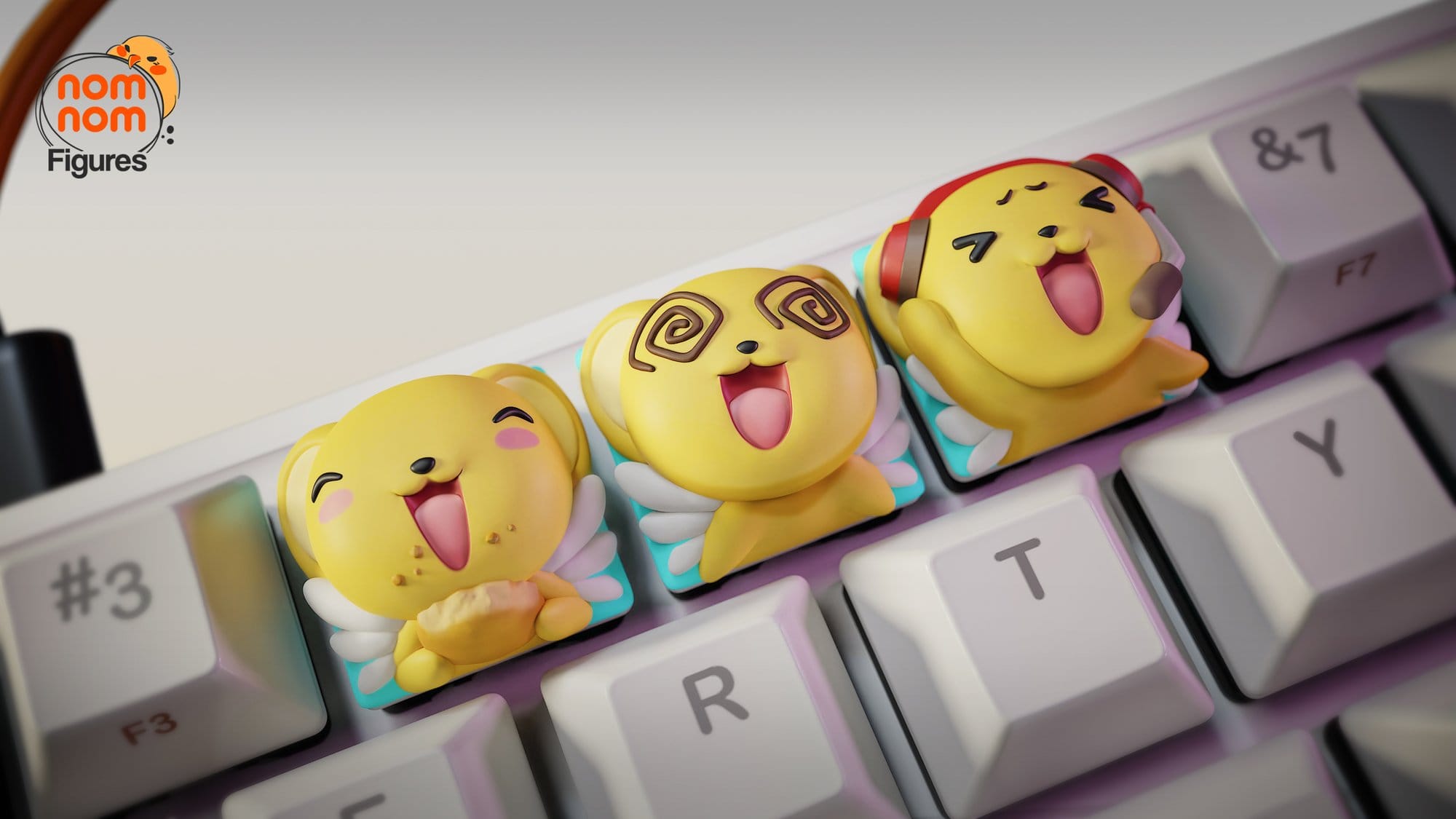
#3/F3 and &7/F7 keys, with the E, R, T, Y row in front. Left to right: the snacking face with crumbs and the cream bun, the dizzy face with brown spirals, the headset face with red headphones and mic. This is the clearest view of the front of each face and of the mint cap body under the yellow.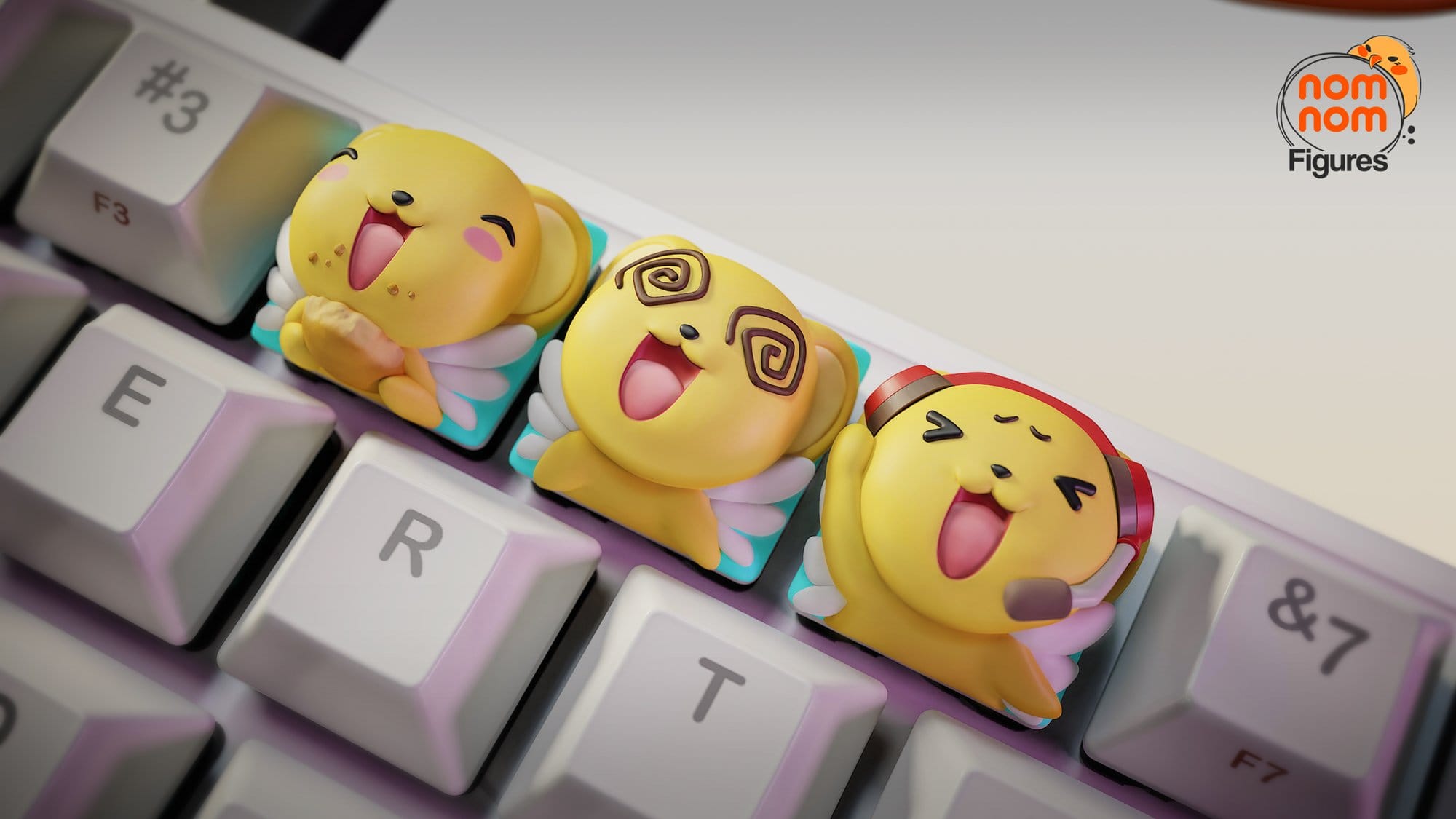
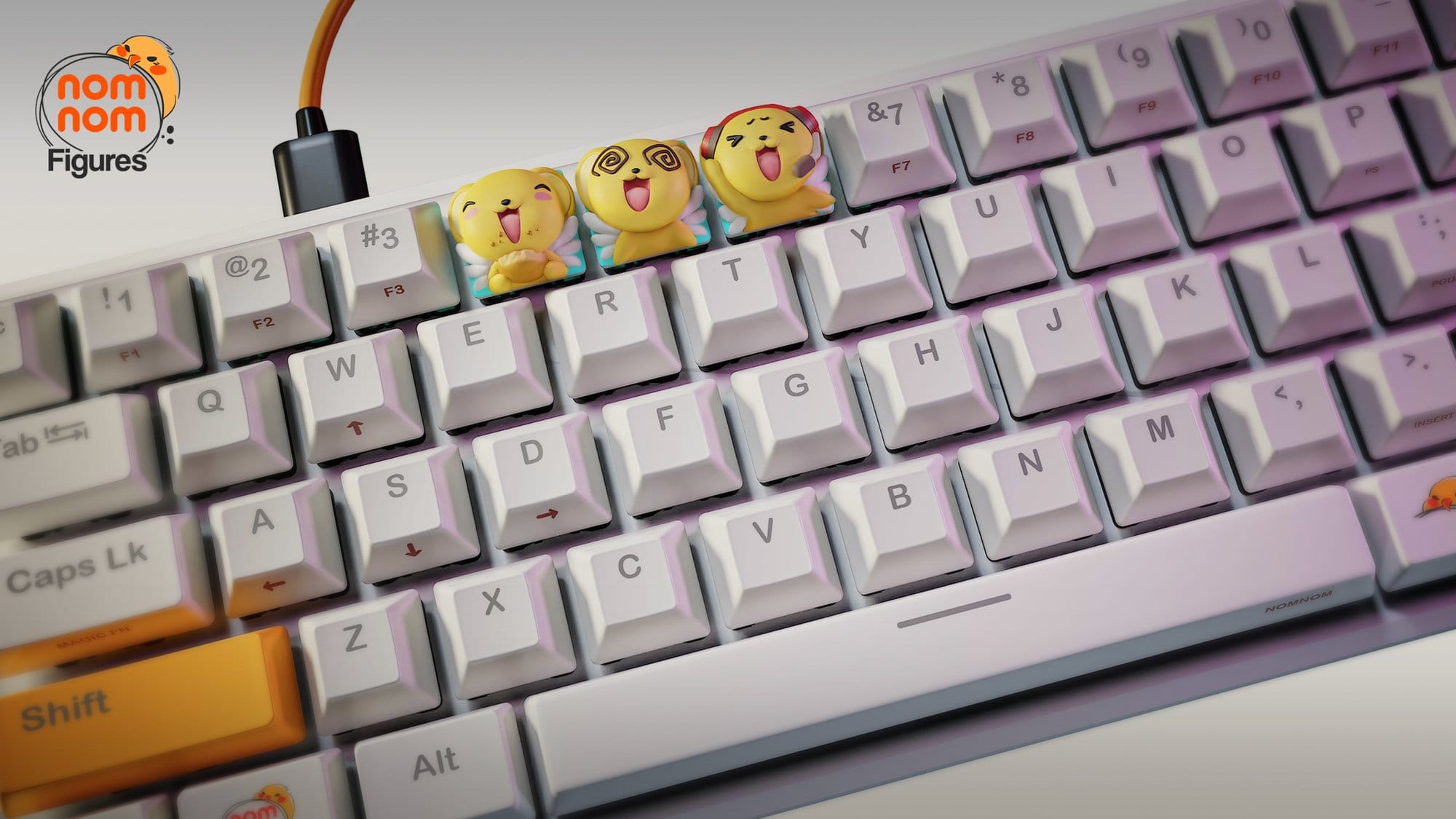
#3 key with the USB cable behind them, and an orange Shift key at the lower left. This is the only render that gives a sense of scale against a full board and shows that the caps sit a little taller than the keys around them.Links
- Studio Patreon: NomNom Figures on Patreon
- Studio store: NomNom Figures on Cults3D
- CGTrader: NomNom Figures on CGTrader · Keroberos Face Keycaps on CGTrader